Real-time expense management on the cards you already use
Barespend is expense management software for small and growing businesses. Your team texts a photo of a receipt. Barespend reads it, matches it to the card or bank transaction, codes it to your chart of accounts and sends it to your books.
No cards to switch. No expense reports to fill in. Less month-end for everyone.
Free for 7 days. No credit card required. Works with QuickBooks Online, Xero and Sage Intacct, plus NetSuite by file export.
Everything you need to take expenses off your plate
Receipt capture
Receipts come in by text, email or upload, and the merchant, date and amount are read for you.
Learn moreExpense management
Card spend, out-of-pocket claims, mileage and split expenses, all in one place.
Learn moreCard matching
Every card and bank transaction is paired with its receipt automatically.
Learn moreAccounting integrations
Sync with QuickBooks Online, Xero and Sage Intacct, or export a file for any other system.
Learn moreOn your phone
Text or email a receipt from any phone and it becomes an expense. Nothing to install.
Learn moreGetting started
Connect your bank, cards and accounting system yourself, or book a demo and we’ll set it up with you.
Learn more
Expense management built for the way teams spend now
- See card spend as it posts
- Receipts by text, with no app to download
- Matched whichever arrives first
- Coded and sent to your books
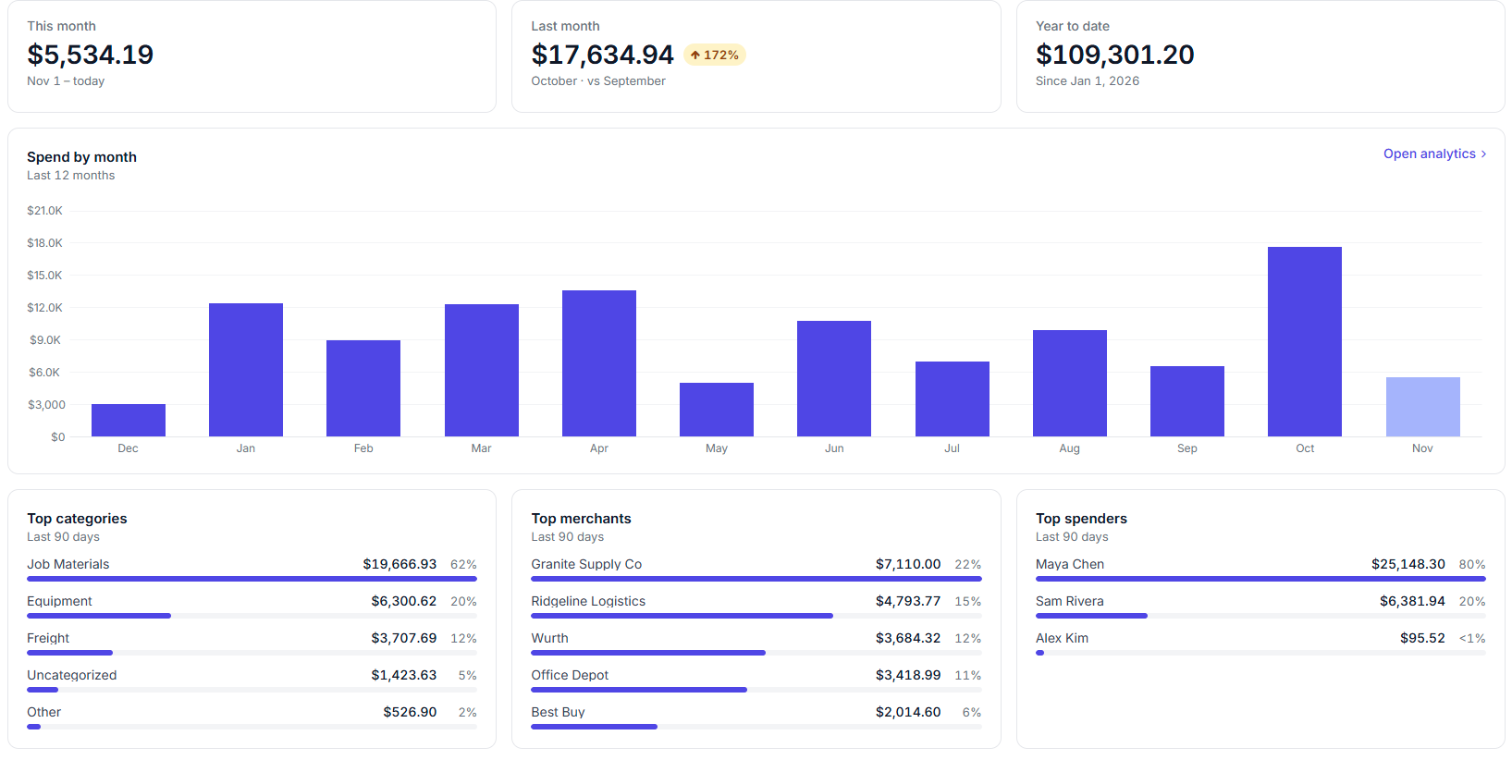
Card spend you can see as it happens
Connect the business cards and bank accounts you already have. Transactions flow into Barespend as they post, pending charges included, so nobody waits for the statement to find out what was spent.
How card matching works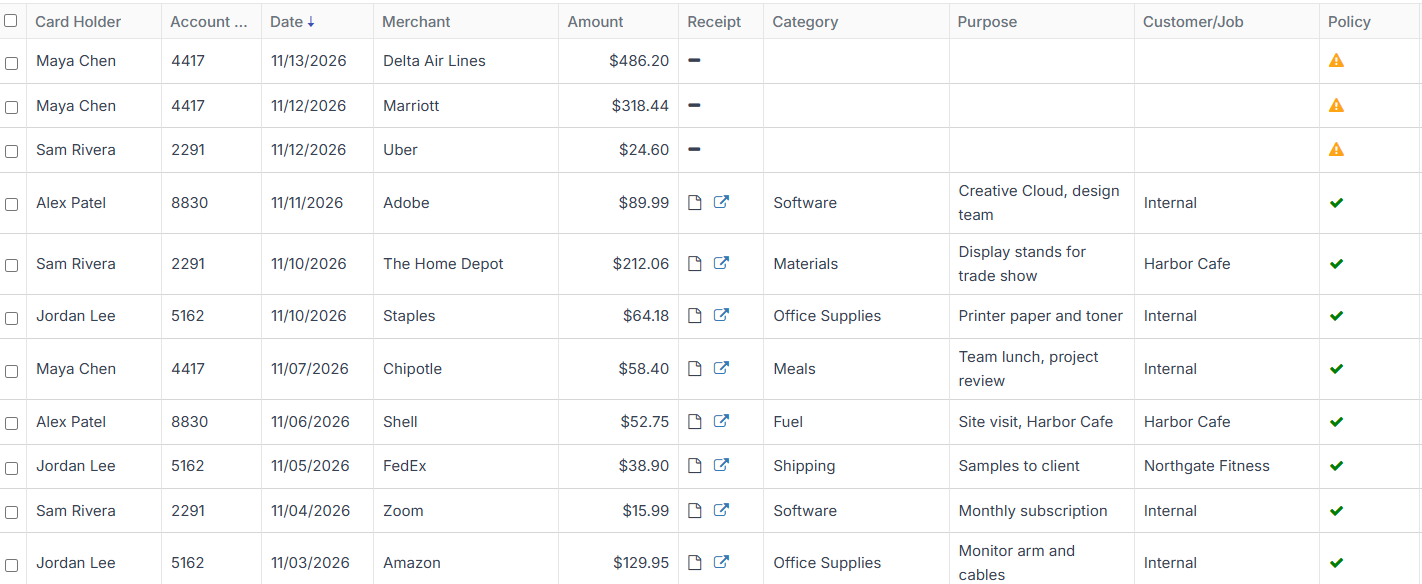
Text a receipt, and that’s the expense
Employees text a photo of the receipt to Barespend. It reads the merchant, date, total, tax and tip, then replies with a link to check the details. There’s no app to download.
All the ways to send receiptsMatching that doesn’t care what comes first
Receipt before the charge or charge before the receipt, Barespend pairs them up on its own, even when a tip changes the total. Anything it can’t match is flagged for a quick look.
See the matching rules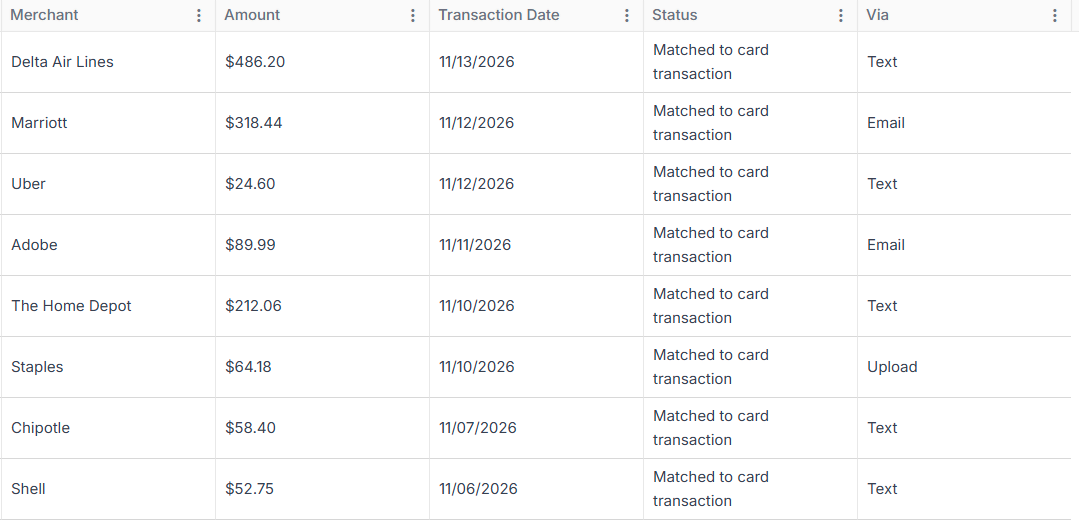
Straight into your accounting system
Barespend brings in your chart of accounts, classes, customers and vendors, then sends each coded expense to your books with the receipt attached.
Explore integrations“Our previous expense management software was archaic and lacked the tools we needed to get receipts in and reconciled to our books in a timely manner. We couldn’t find a solution that met our requirements until Barespend. Simple, intuitive, and easy to use for the entire company. Our biggest pain points solved!”

Flexible enough for the way you work
- ReimbursementsOut-of-pocket spend goes in with a photo, and everyone can see whether a claim is submitted, approved or paid.
- ApprovalsProEach claim goes to the employee’s manager to approve, or send back with a comment.
- ReportingSpend by month, by category, person, department, merchant, location or job, with a breakdown you can click into and export to Excel.
Talk to the people who build it
Every plan includes fast, responsive support from the Barespend team, with no add-on fee for talking to a person. Your feedback goes to the people building the product, not into a ticket queue.
Your expense data, kept safe
- Encrypted in transit. Everything between your browser and Barespend travels over TLS 1.2 or higher.
- Encrypted at rest. Data sits in Azure SQL Database and receipts in Azure Blob Storage, both encrypted at rest.
- Role-based access. Owners, admins, managers, bookkeepers and employees each see only what their role allows.
- Penetration tested. An outside firm has tested the platform. Ask us for a copy of the report.
Learn more
- Compare BarespendSide by side with Fyle, Expensify and SAP Concur on price, support and receipt matching.
- Accounting integrationsQuickBooks Online, Xero and Sage Intacct directly, NetSuite by file export.
- Free toolsAn expense report template, mileage and per diem calculators, an expense policy builder and more.
- GuidesPlain-English how-tos on matching receipts, month-end close and expense policy.
Frequently asked questions
What is Barespend?
Barespend is expense management software for small and growing businesses. It collects receipts by text, email or upload, matches each one to the card or bank transaction it belongs to, codes the expense to your chart of accounts and syncs it to your accounting system.
Who is Barespend for?
Small and growing businesses, like a SaaS team that’s doubled in a year, where expenses have outgrown spreadsheets but an enterprise tool would be overkill.
Why use expense management software instead of spreadsheets?
Spreadsheets need someone to chase receipts, line them up against statements and recode everything at month-end. Expense software does that matching and coding as people spend, so the books are closer to done when the month ends and missing receipts show up the day they’re missing.
How do employees in the field send receipts?
They text a photo of the receipt to Barespend, forward it by email, or upload it. There’s no app to install, so people who are rarely at a desk can send a receipt in seconds.
Does Barespend track mileage?
Yes. Employees enter a trip and Barespend works out the distance from the route on Google Maps, so the claim goes in with the miles and the route behind it.
Does Barespend work with my accounting software?
Barespend integrates directly with QuickBooks Online, Xero and Sage Intacct. Using something else? Barespend also works with most other accounting systems through file export and import.
What makes Barespend different?
It works on the cards and bank accounts you already have, so there’s no new card program to roll out. Receipts can come in by plain text message, matching works whichever arrives first, and you can talk directly to the people building the product.
Which cards and banks does Barespend work with?
Barespend connects to the business cards and bank accounts you already use, and the price is the same whichever you choose. If a bank can’t connect, you can import a statement file instead.
How long does it take to get started?
Most of the setup is connecting your bank accounts, cards and accounting system, which you can do yourself during the trial. If you use Sage Intacct or have multiple entities, book a demo and we’ll set it up with you.
How does billing work?
Plans start at $5 per active member a month on an annual plan, or $6 month to month, with no user minimums. You only pay for people who send a receipt or have a card transaction that month; admins and approvers who didn’t spend aren’t billed.
Is there a free trial?
Yes. You can try Barespend free for 7 days, with no credit card required. Connect your accounting system and cards, send a few receipts and see them matched and coded. If you use Sage Intacct or have multiple entities, book a demo and we’ll set it up with you.